cluster may be public (all k8s’s vm have external IPs) or private (only internal IPs, only accessible inside subnet), includes:
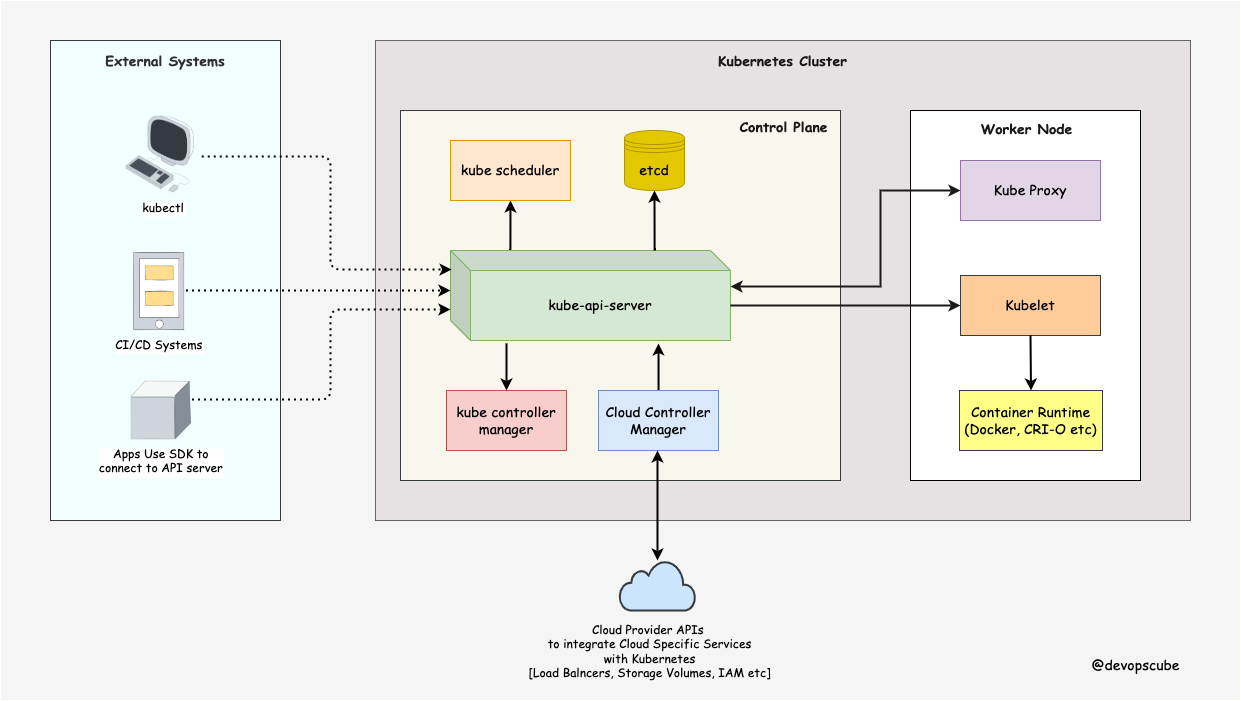
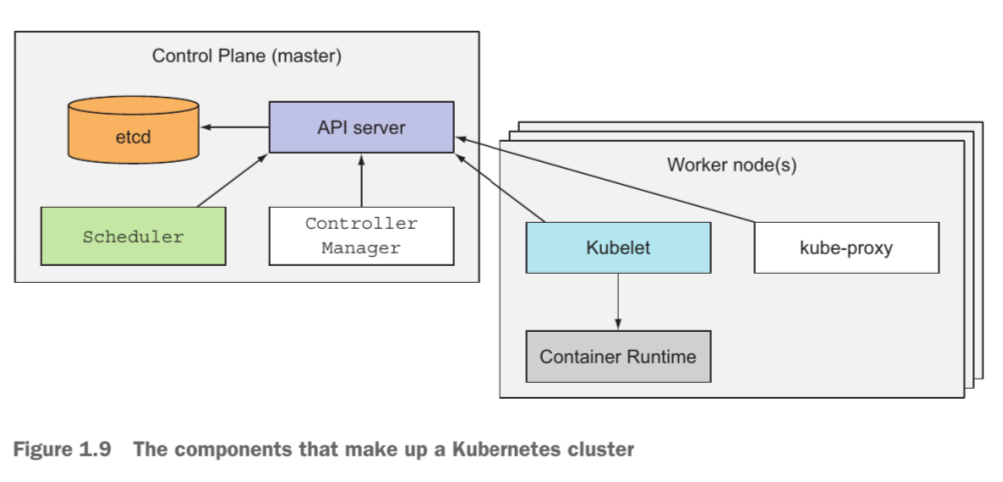
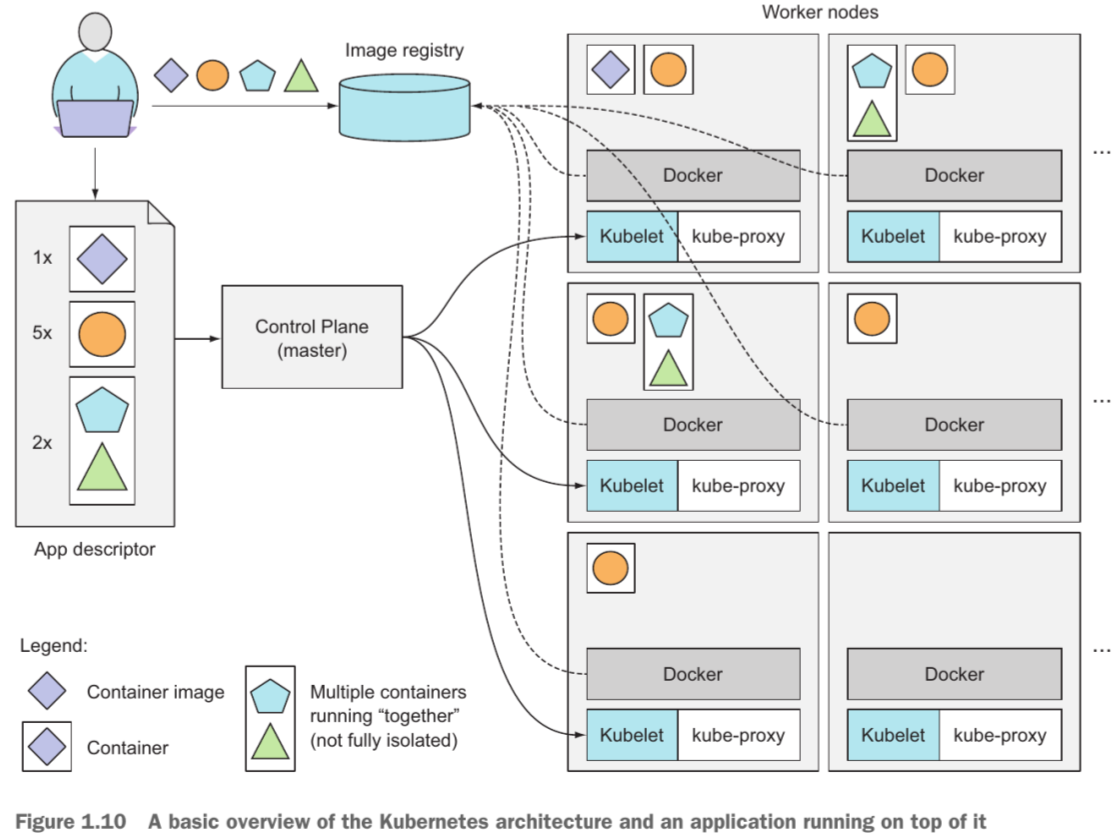
control plane
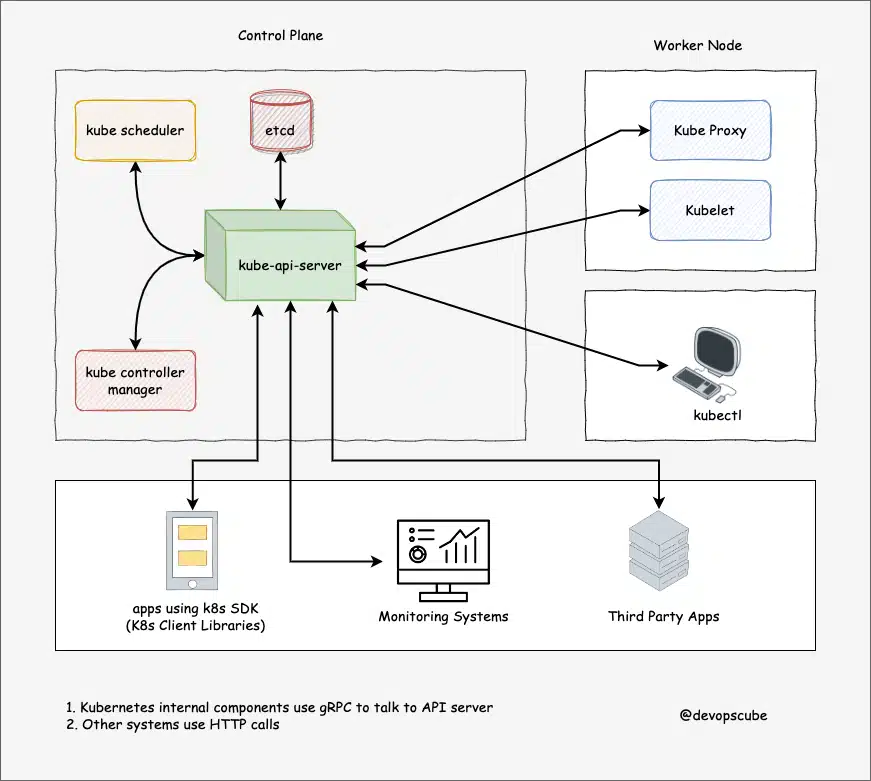
api server:
central hub of k8s cluster, expose kubernetes api for users and third-party services (using http rest for users and grpc)
connection point for k8s components and users
scheduler:
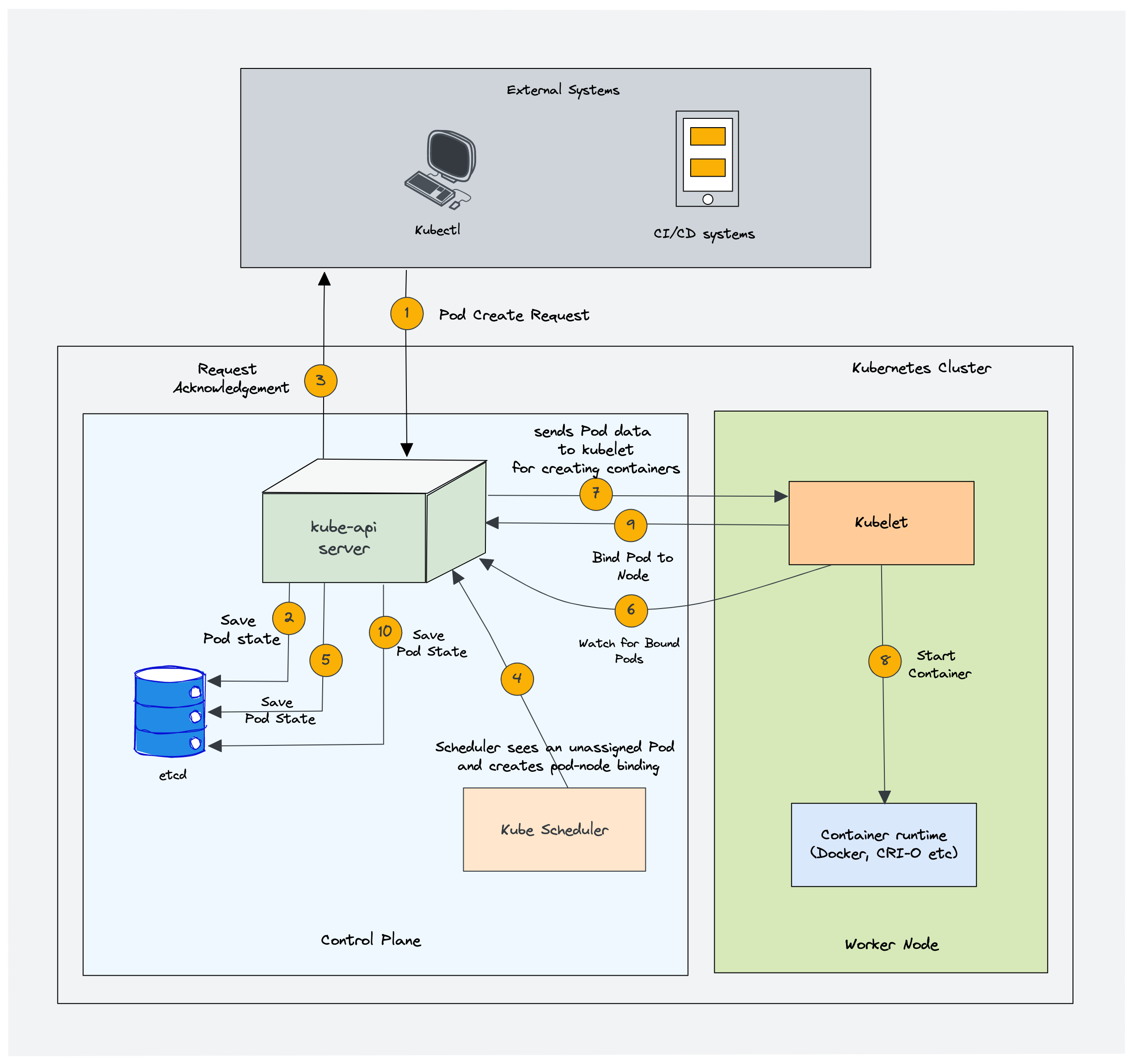
determine where workloads should run (optimal node) by filtering-scoring operations (2-phase)
schedule pods based on their priority (high to low)
controller manager:
run infinite control loops for: perform creating/replicating pods, keeping track of worker nodes, handling node failures, …
watch actual and desired state of cluster
etcd:
strongly consistent distributed data store for storing cluster’s state/configuration
stores configurations under /registry directory
can only communicate through api server
cloud controller manager (CCM) for cloud platform deployment
provision vm instances, load balancers, storages, …
worker nodes
container runtime: docker, containerd, …
run on all nodes of cluster
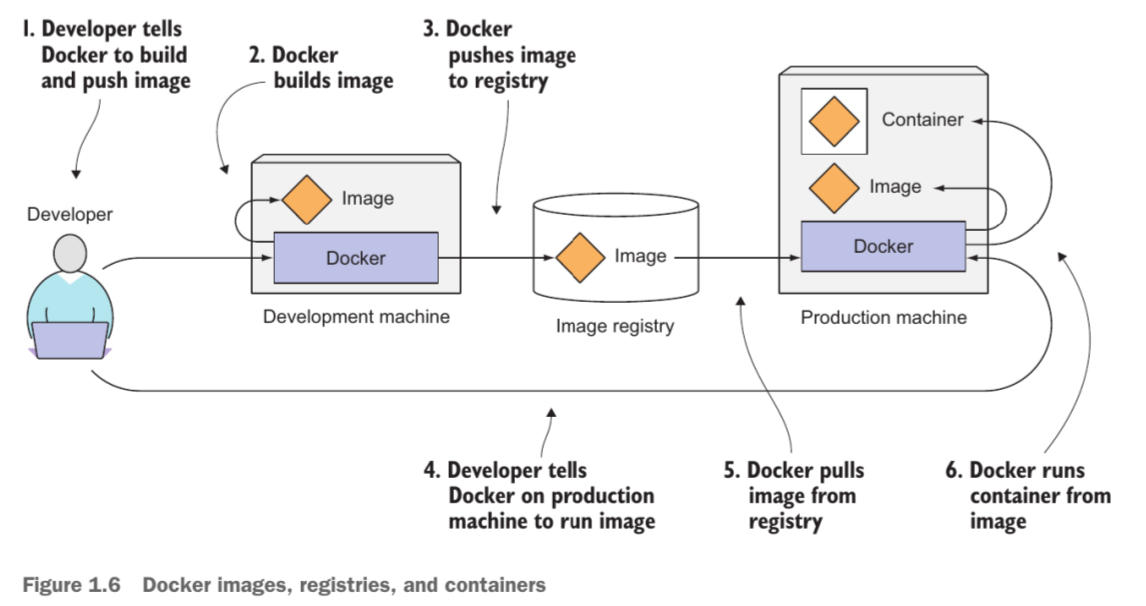
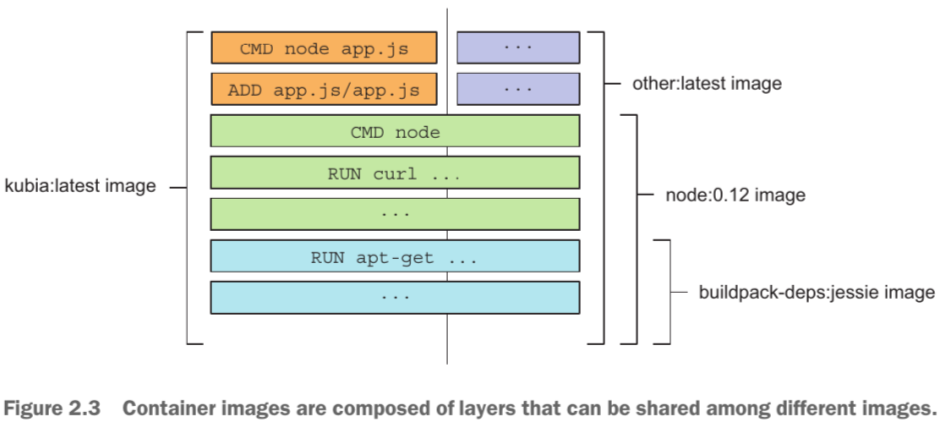
pull images, run containers (with allocating/isolating resources)
contains:
Container runtime interface (CRI): set of apis for different runtimes
open container initiative (OCI)
kubelet:
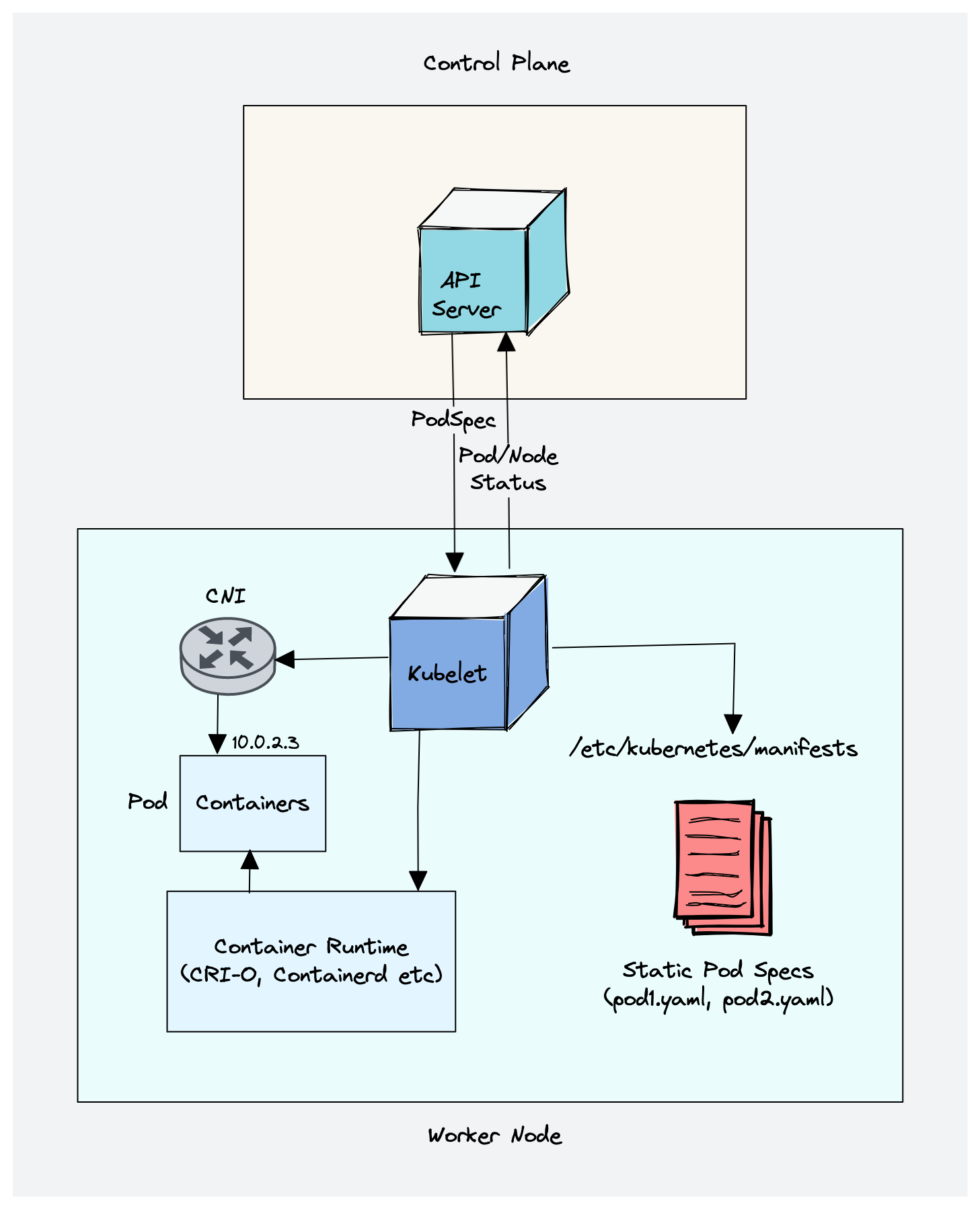
manage pods (from podSpec) on its node by connection with api server and container runtime (like create/modify/delete pods, handle liveness/readiness probe, mount volumes, …)
run as daemon process (managed by systemd)
manage static pods directly (not from api-server): api-server, scheduler, controller manager, and etcd are static pods during control plane bootstrapping (in kubeadm-bootstrapped clusters)
static pod spec are stored under directory /etc/kubernetes/manifests
kube-proxy:
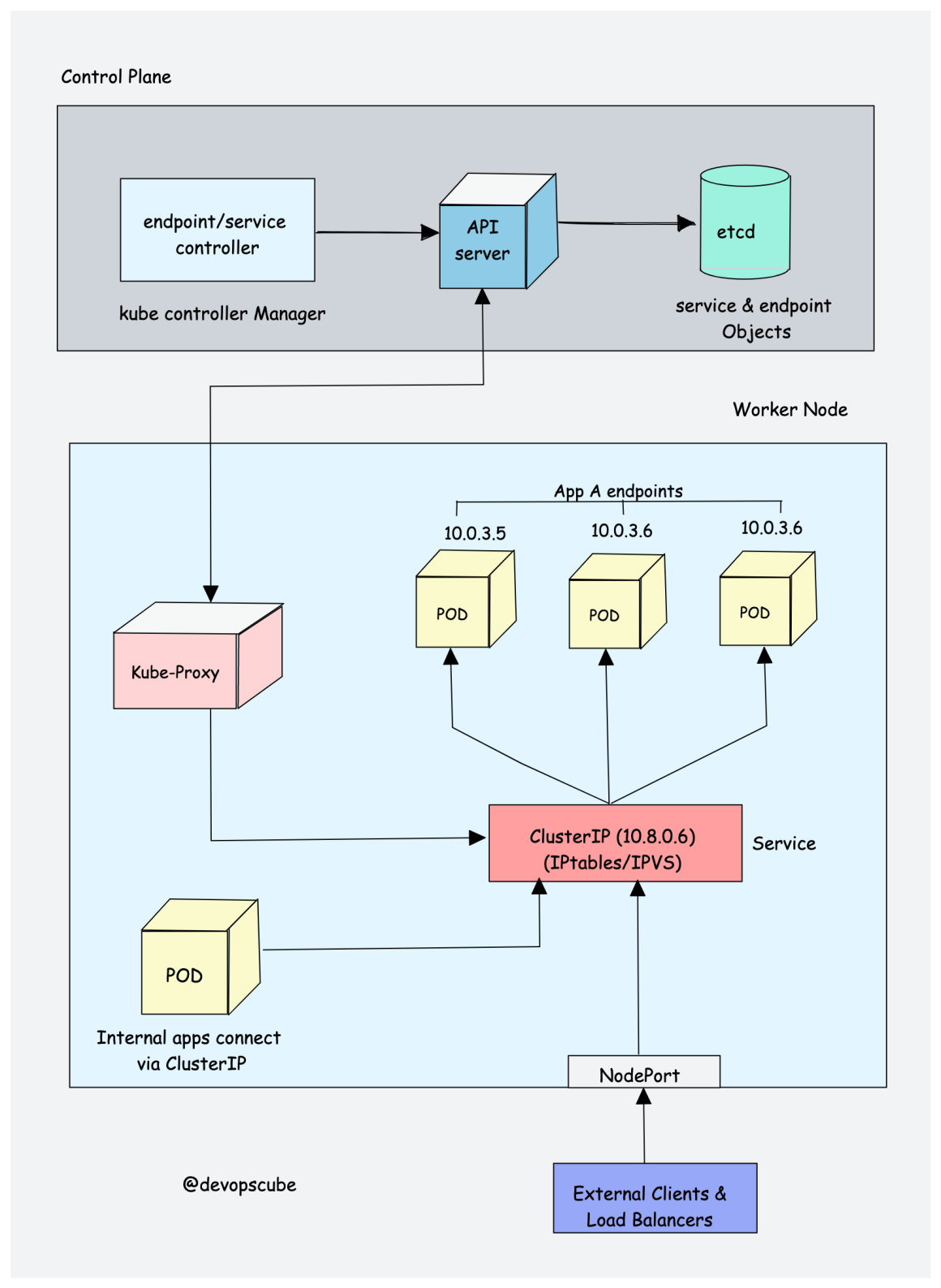
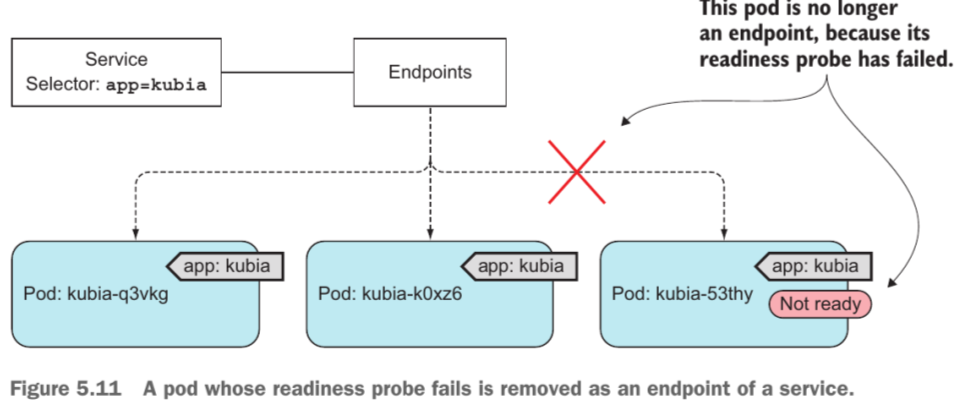
k8s’ service is a way to expose pods, create an endpoint object that contains all ip addresses of pods under service
is daemonset deployment (not daemon process like kubelet), implements k8s services concept (single dns for a set of pods with load balancing)
proxies TCP, UDP, SCTP, and not understand HTTP
network traffic routing to backend pods; 3 modes:
iptables (default): rules per service/endpoint, no userspace; doesn’t scale well beyond ~10k services
ipvs: uses Linux IPVS (L4 LB in kernel), O(1) lookup, multiple LB algorithms (rr, lc, sh, …) — preferred at scale
nftables: added K8s 1.29 (alpha); replaces iptables with nftables framework, more efficient rule management
k8s interfaces:
extend and customize k8s’ core functions
some interfaces:
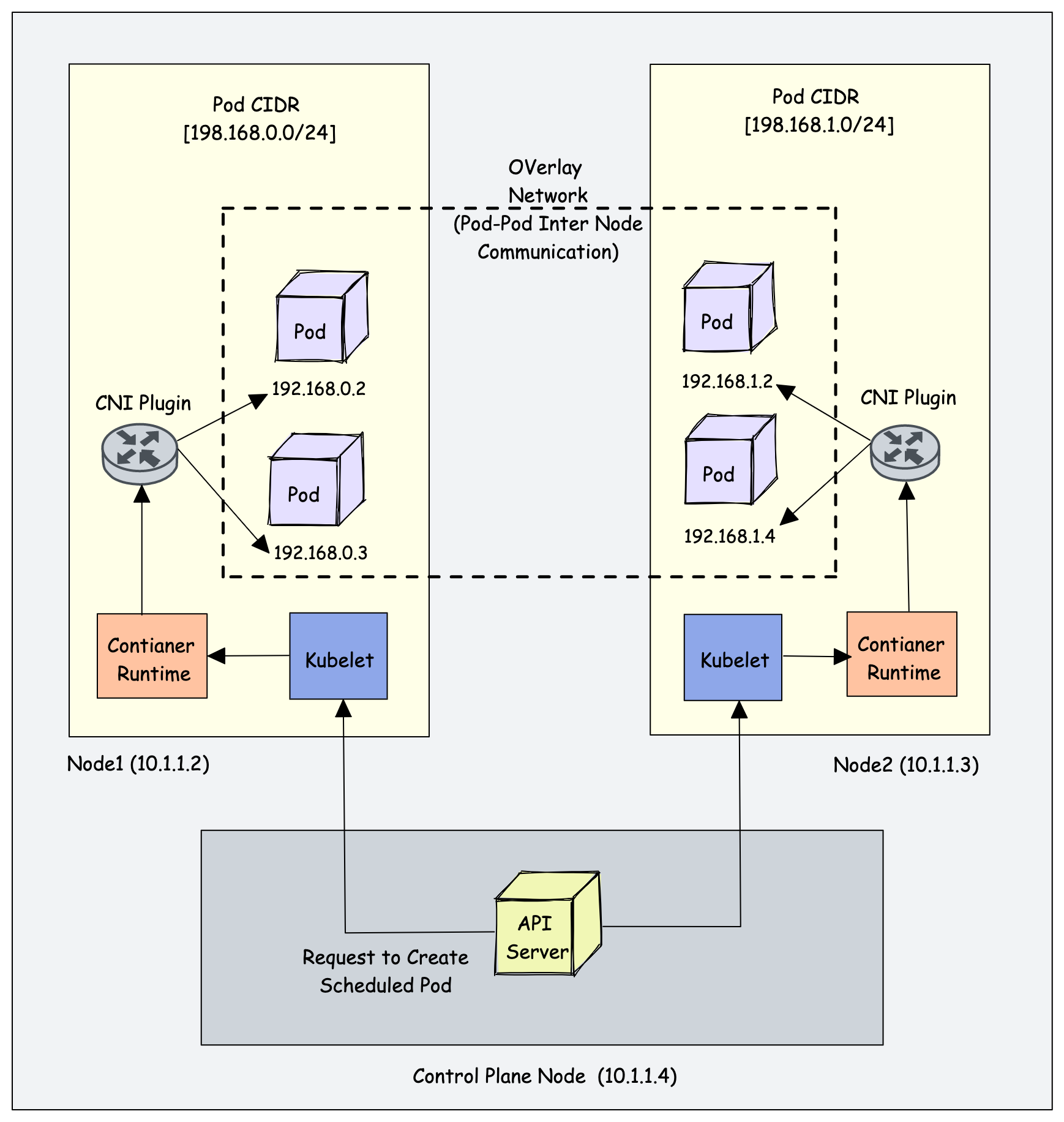
container networking interface (CNI)
assign CIDR (ip addresses range) for each node, and configure pod network
enable networking between pods across the same or different nodes using overlay network
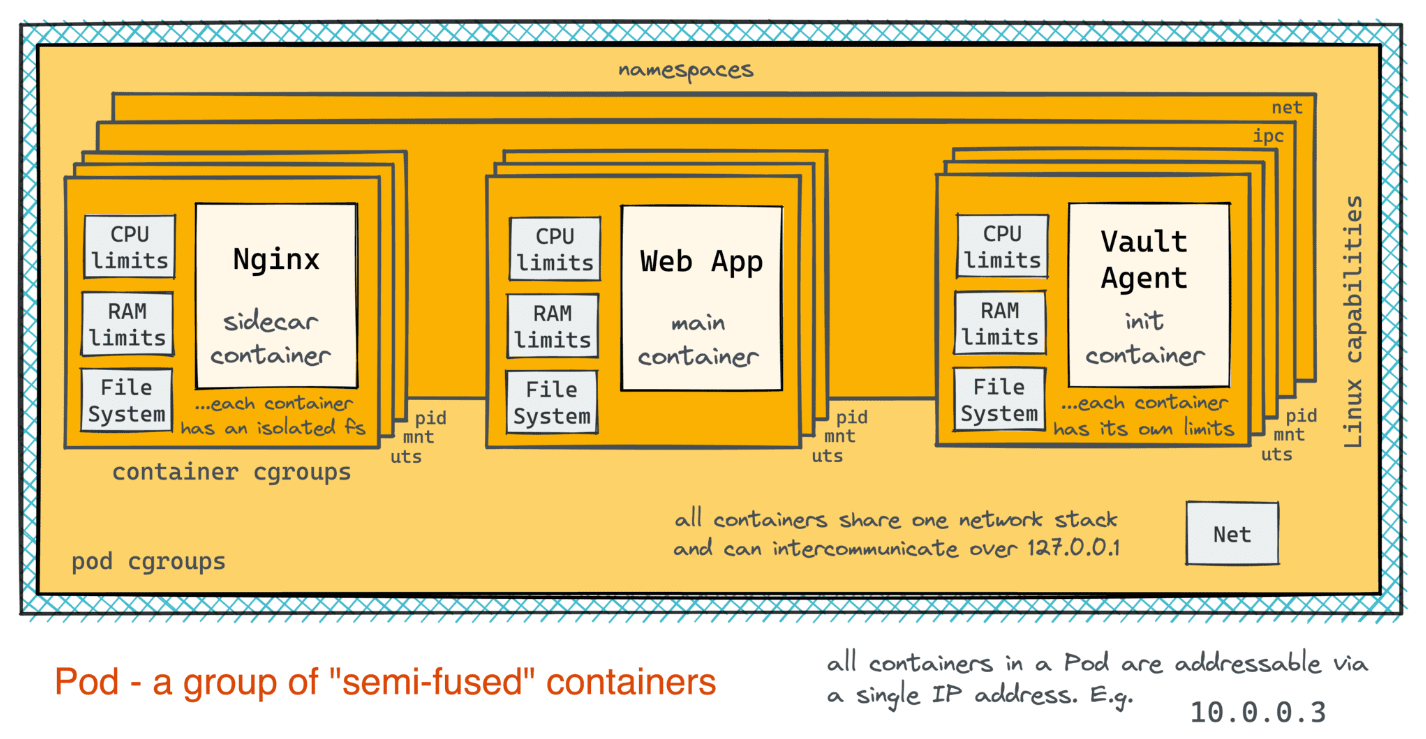
co-located group of containers - basic building block of k8s (all pod’s containers run on same node) -> group of cohesive containers
all pod’s containers share same ip address and port space
all pods can access other pods by their ip address (flat inter-pod network)
pods are managed by labels
why running pod instead of container?
use multiple processes (each process per container). if running multiple processes on same container, have to keep all processes running, manage their logs, … (pdf)
liveness probe: checks if container is alive -> kubelet restarts container on failure
readiness probe: checks if container is ready to serve traffic -> removes pod from Service endpoints on failure (no restart); use for slow-starting or temporarily overloaded pods
startup probe: checks if container has finished initializing -> liveness/readiness probes are disabled until startup probe succeeds; avoids false liveness kills during slow startup
Static pod
managed directly by kubelet on a specific node, without the api server (from control plane like deployment) observing them (always bound to one kubelet)
kubelet creates a mirror pod on api server for each static pod, all pods are visible from api server (but cannot control static pods from here)
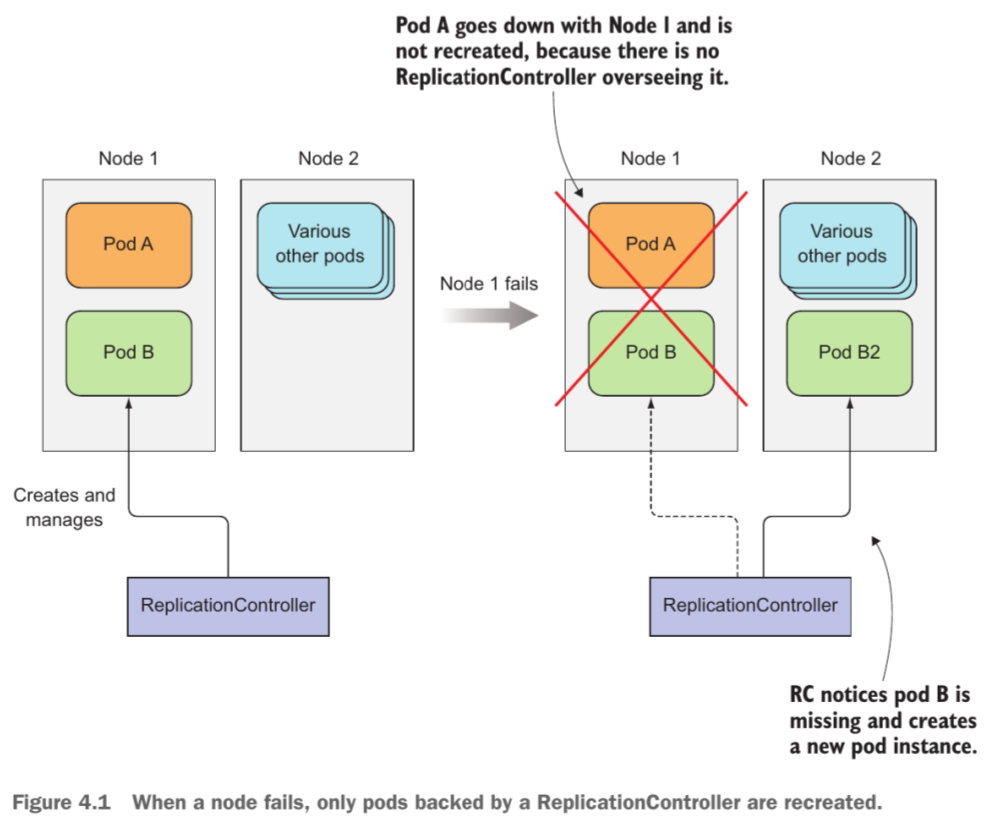
Replication Controller / Replica Set (RC with improved selector) / Daemon Set / Stateful Set -> Deployment
k8s resources keep pods running and replace unhealthy pods
3 main components:
label selector: determine pods in scope (if pod’s label is modified, it can be removed from RC’s scope)
replica count: desired number of pods
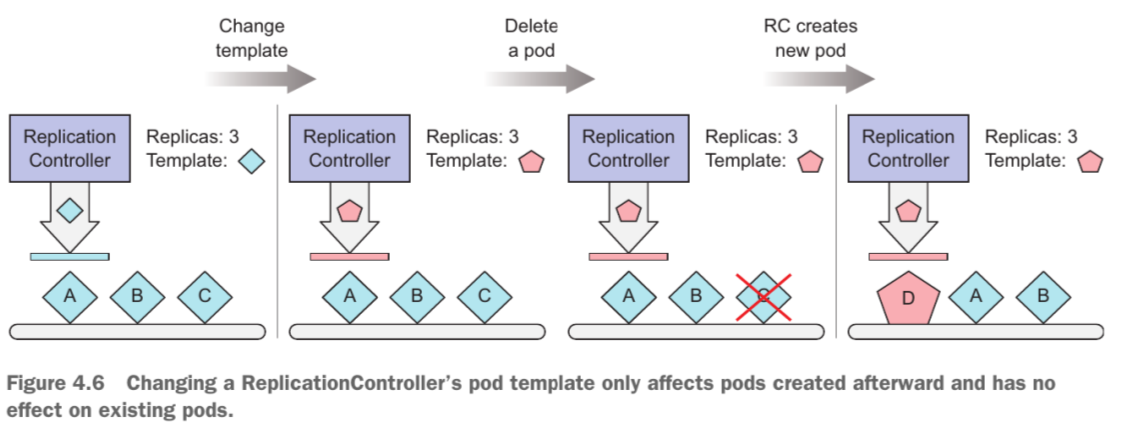
pod template: container’s configuration for new pod deployment
Modify single pod’s template
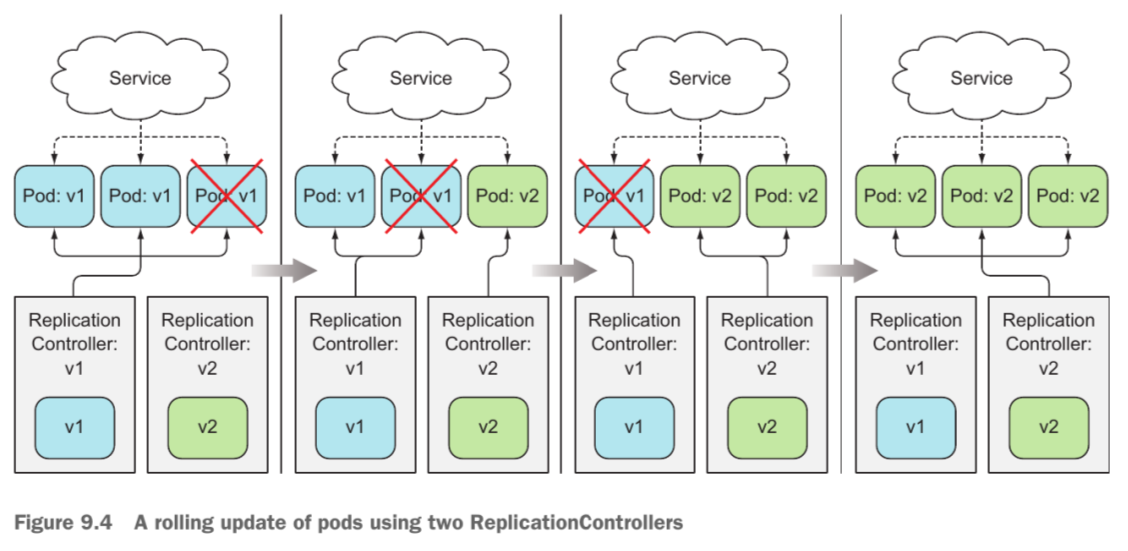
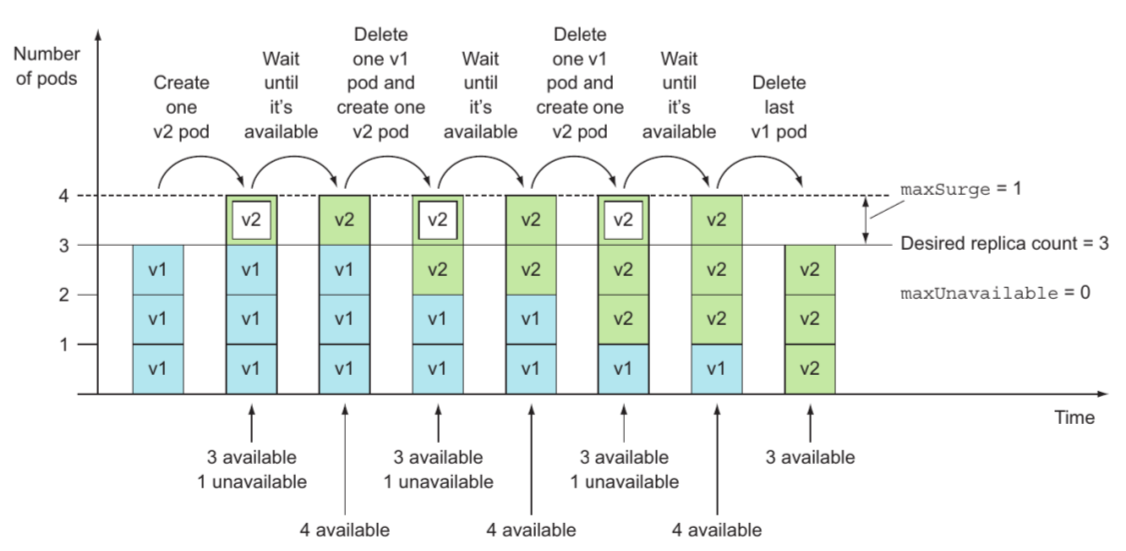
Update deployment’s template and replace all pods with new ones
Rolling update (create and replace in same time)
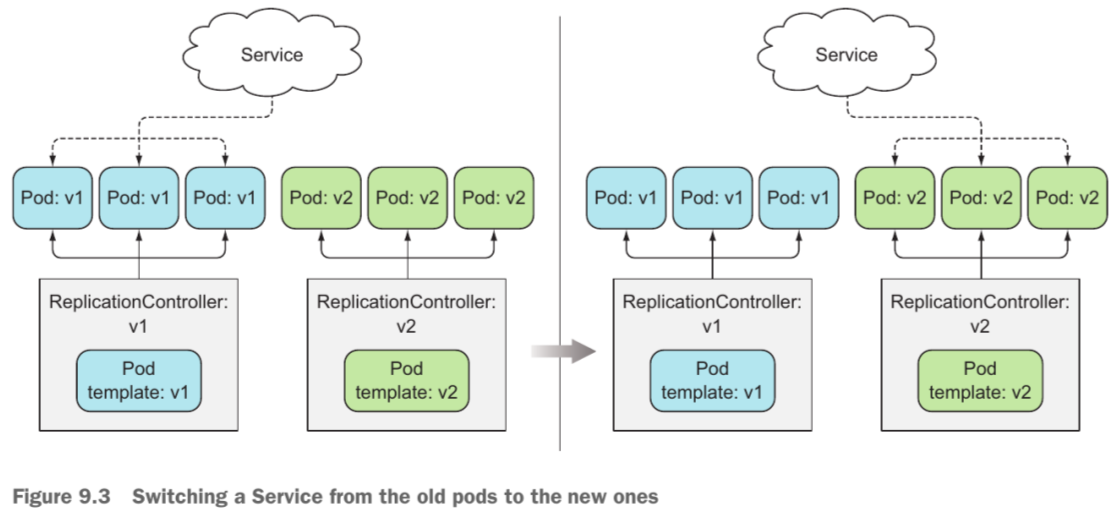
Blue-green update: create new pods and change service’s pod selector
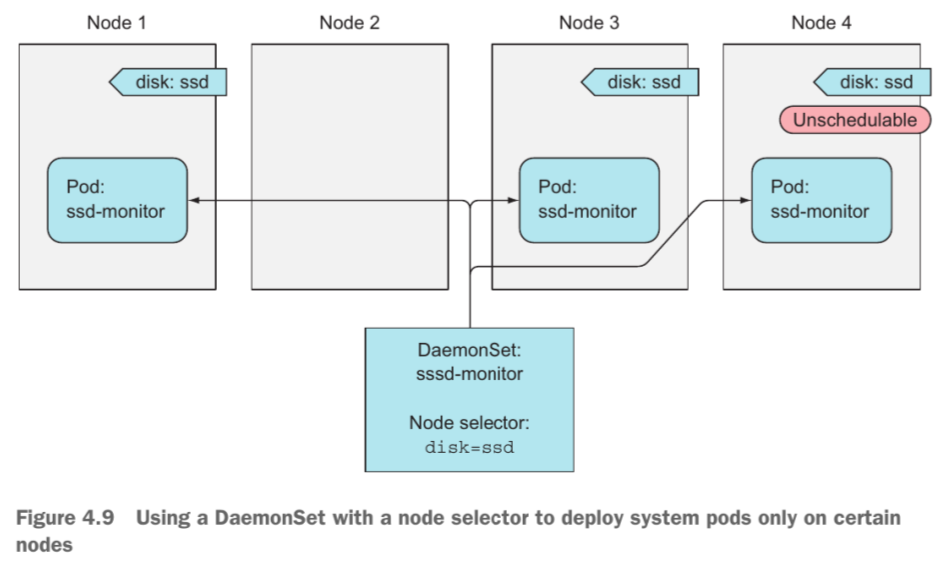
DaemonSet (run exactly one pod on each node)
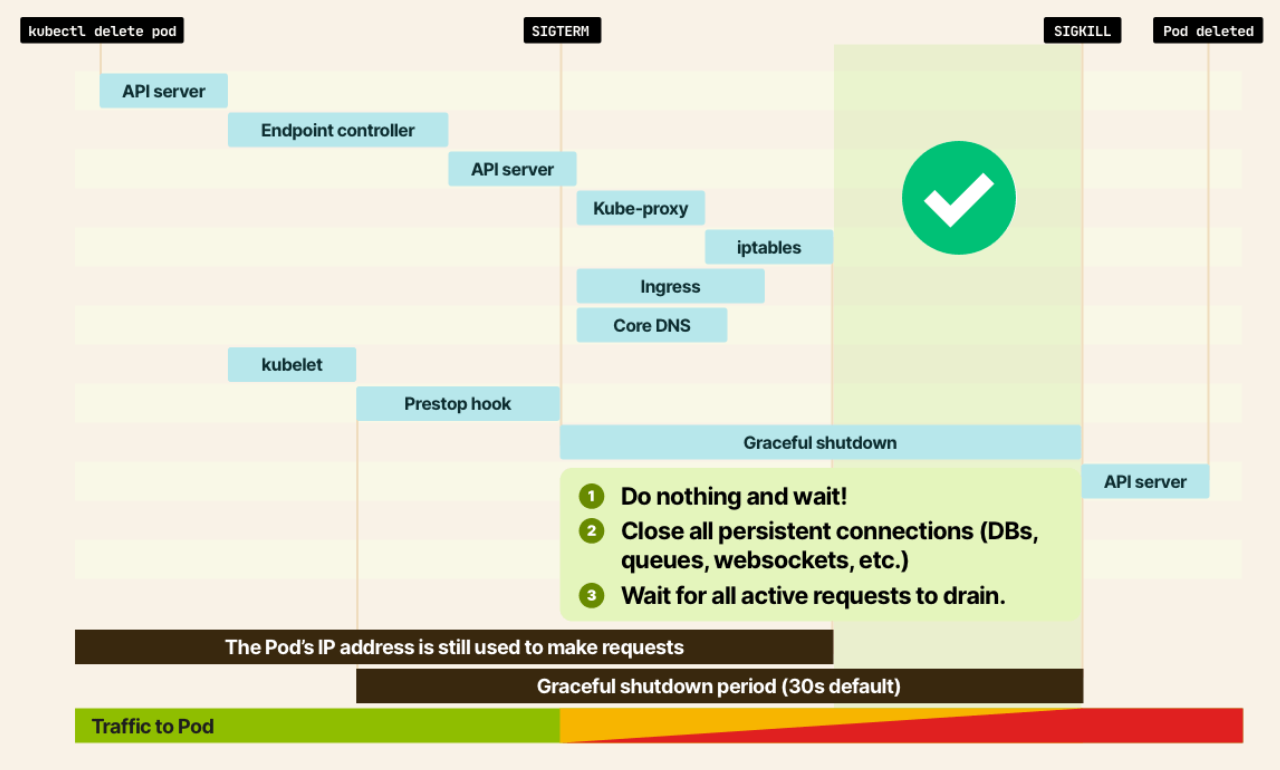
Graceful termination
stateful application
stateful pods are initialized sequentially, based on their indices
scaling statefulset relates to increase/decrease number of replicas
to receive and handle SIGTERM for graceful shutdown, process must be running as PID 1 (eg. run node index.js instead of npm run start)
SIGKILL cannot be caught or handled by any process — kernel sends it unconditionally after terminationGracePeriodSeconds (default 30s) elapses
shell-form CMD (npm run start) spawns a shell as PID 1 which does not forward signals to child processes
restart pod, deployment, …
kubectl rollout restart ...
service
pods are ephemeral, pods’ ip addresses are assigned after pods have been scheduled to nodes, and many pods may provide same service
service is k8s resource to make single, constant entry to a group of pods providing same service (using pods selector)
can use session affinity to force service’s requests to certain pod
3 service types:
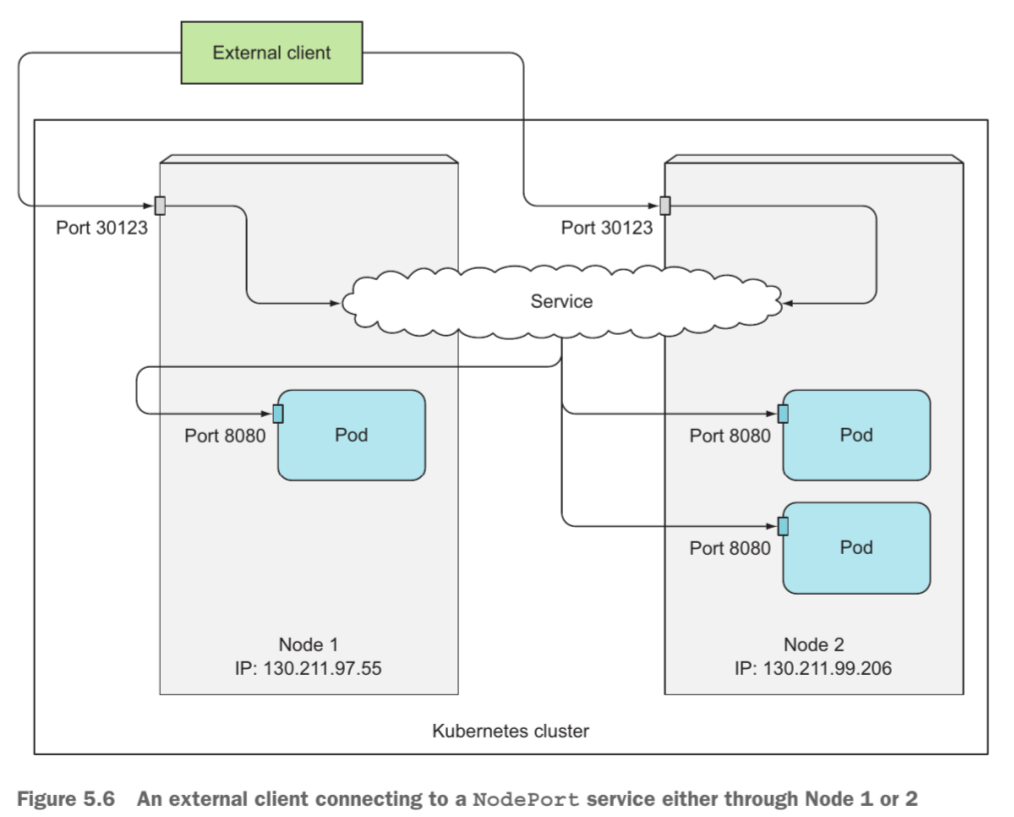
node port
cluster node opens port (30000-32767) on node itself, and redirect traffic from this port to underlying service
load balancer
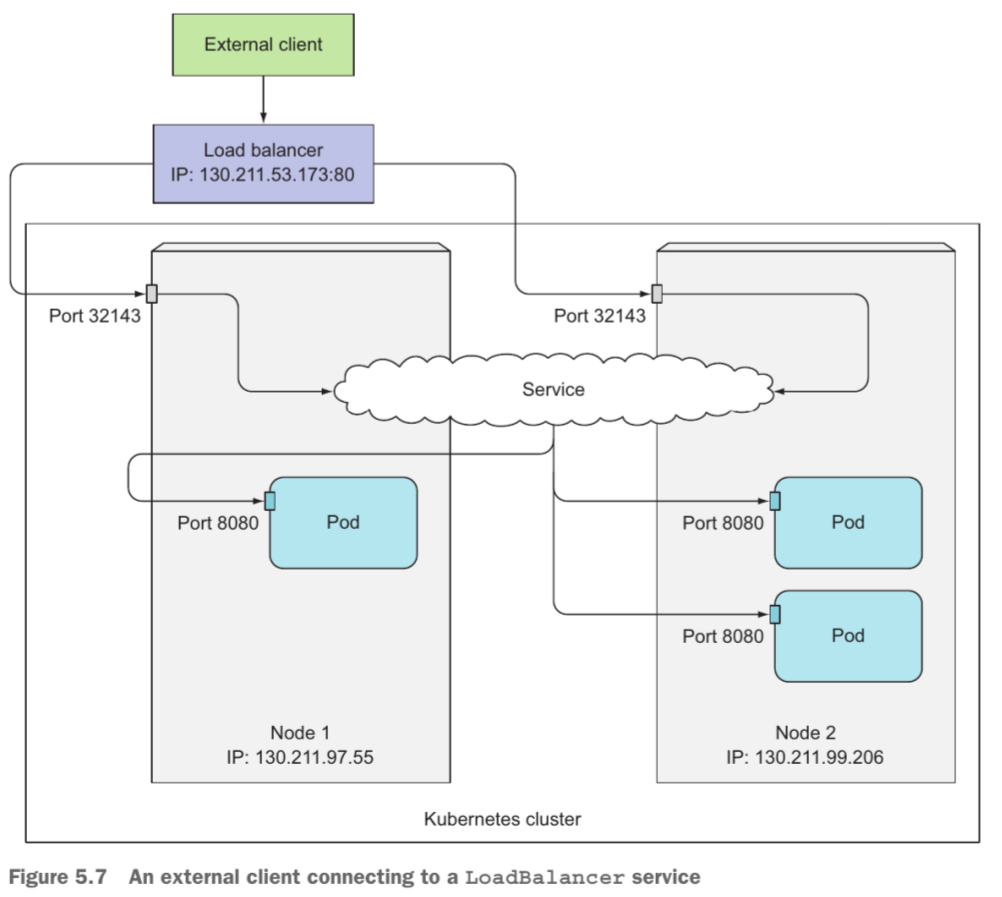
same as node port, and make service accessible from load balancer (provisioned by k8s cloud infrastructure like GCP, AWS, …)
each load balancer service requires a load balancer and its external ip address
cluster ip
only accessible inside cluster (require internal ip address)
use ingress or gateway for external access
headless service
sets clusterIP: None; no virtual IP created
DNS returns individual pod IPs directly (A record per pod) instead of the service VIP
StatefulSets depend on this for stable per-pod DNS: <pod>.<svc>.<ns>.svc.cluster.local
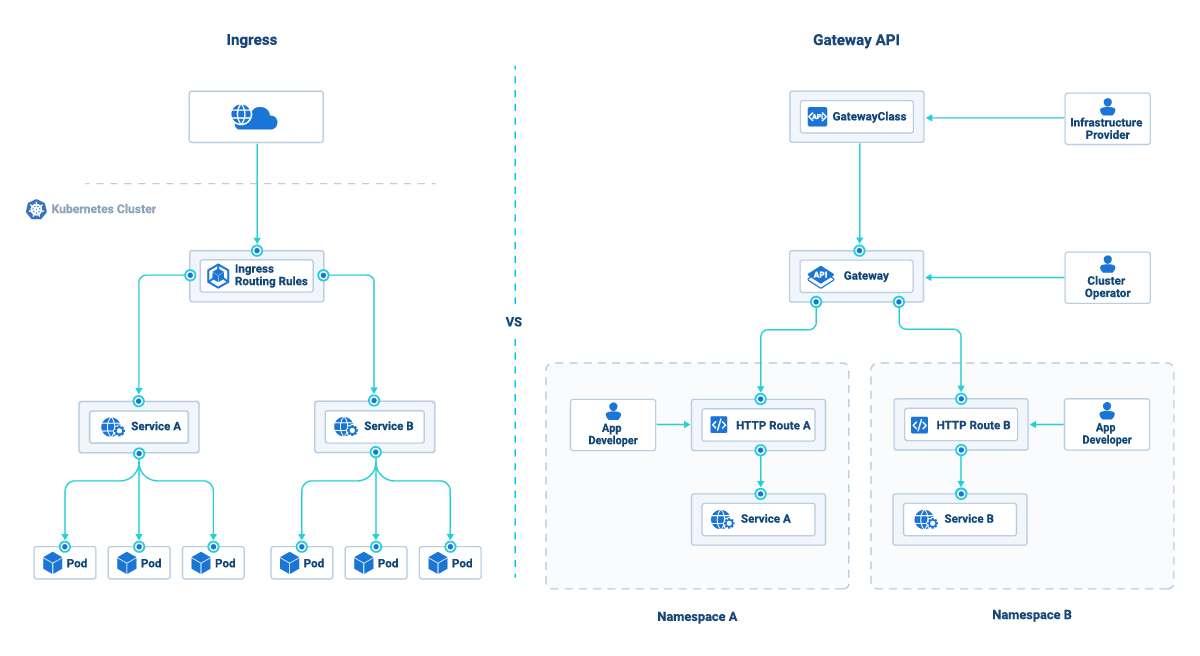
gateway and ingress
are implementation for routing rules
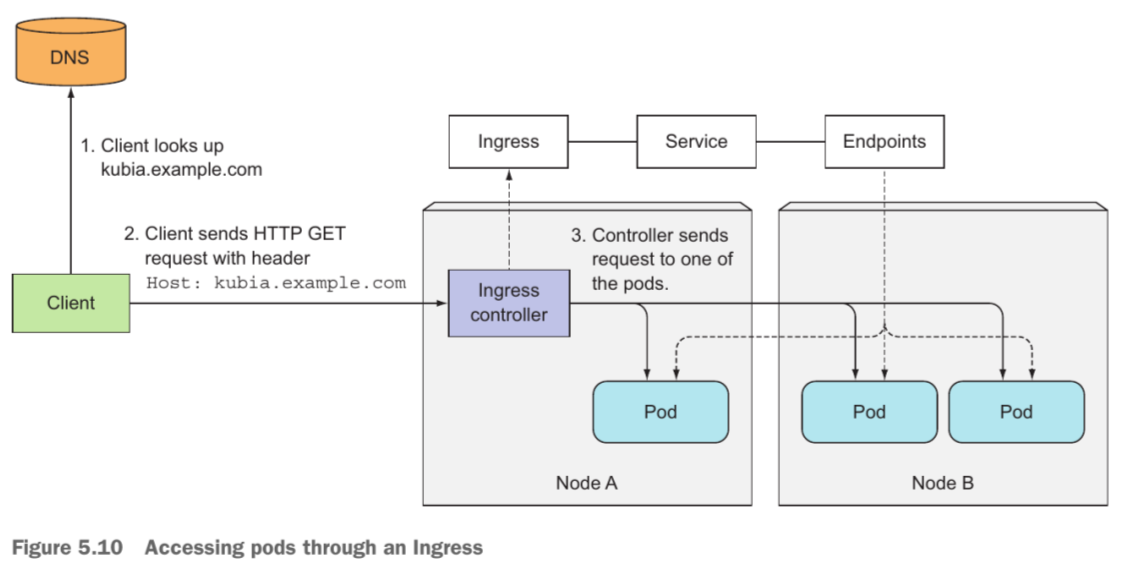
expose multiple services using single load balancer and external ip address (to access cluster’s service from outside)
use rules (url, header, … matching) for routing traffic
ingress
http host, path matching
TLS
many load balancer implementations
requires ingress controllers inside cluster
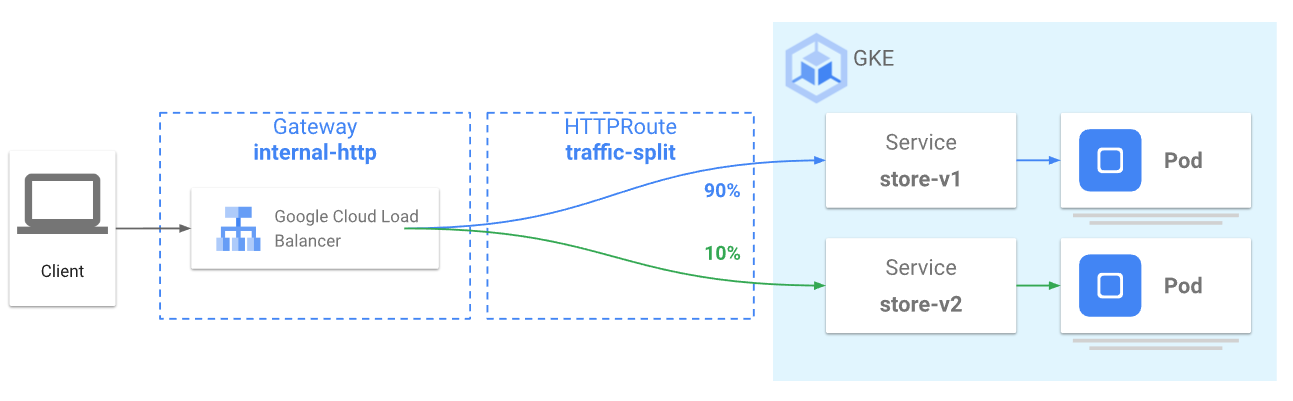
gateway
all ingress’ features
http header matching and manipulation
rate limiting
weighted traffic splitting
ingress vs gateway
auto scaling for pods and cluster nodes
node autoscaling:
increase/decrease number of nodes in node pool (create new node pool if necessary)
pod autoscaling:
need to set CPU/memory’s requests and metrics
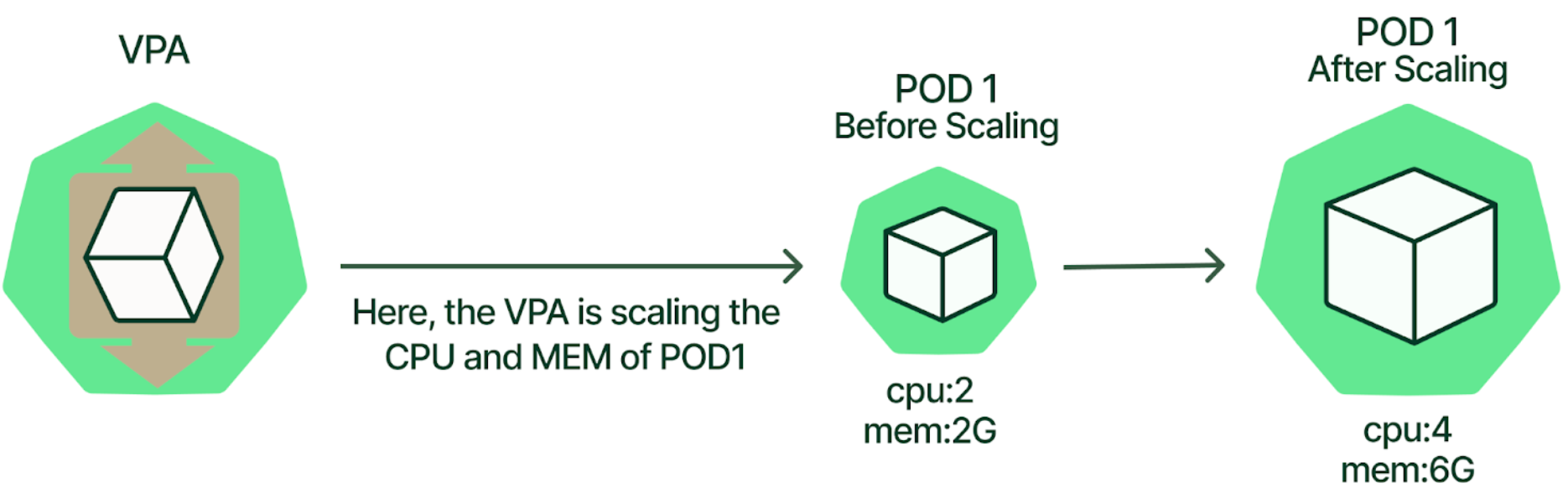
vertical scaling: replace current pods with more resources (CPU and memory) pods
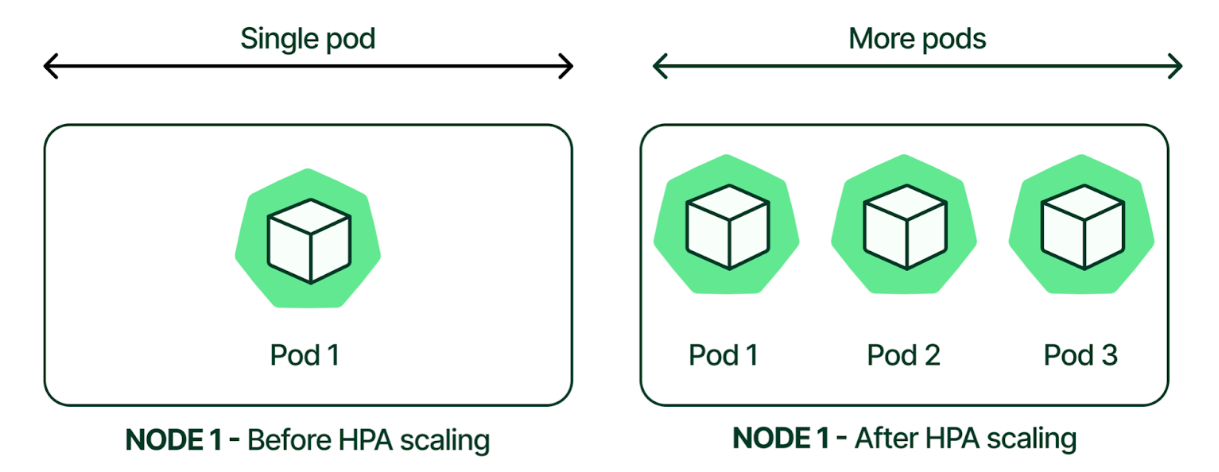
horizontal scaling: increase/decrease number of pods
use stabilization window for scaling (short for scale up, long for scale down)
kubernetes event driven autoscaling (KEDA)
usually use HPA for pod scaling in k8s with limited predefined metrics (like CPU, memory, …) -> KEDA supports custom metrics
KEDA is a standalone operator/controller that introduces its own CRDs (ScaledObject, ScaledJob, TriggerAuthentication); internally creates and manages HPA objects on your behalf — it does not extend the HPA API itself
key roles:
activates/deactivates deployments to scale from/to 0 on no event (different from HPA)
acts as k8s metrics server, exposes event data to HPA to drive scale out
validates resource change to prevent misconfiguration
service ip / pod ip and ip masquerade
service’s ip (ClusterIP) is used for inbound requests only (virtual IP for load balancing between pods); not used for outbound requests
outbound traffic from a pod originates from the pod’s IP, then SNAT’d at the node before leaving to the public internet — this is IP masquerade (implemented by iptables masquerade rules)
2 egress patterns:
node SNAT (masquerade): source IP becomes the node’s external IP — simple, no extra infra, but egress IPs change as pods reschedule across nodes; hard to whitelist
Cloud NAT (centralized NAT gateway): all outbound traffic routed through a managed NAT with a fixed static IP pool — consistent egress IPs for whitelisting, but adds cost and a hop
http-proxy with NAT (in GCP)
connect to public internet with static ips (for whitelisting), but expensive
what it is: a control-loop controller (not just a resource) that periodically (default 15s) reconciles actual metric values against desired targets and adjusts replicas on the scaleTargetRef (Deployment, StatefulSet, ReplicaSet, or any custom scale subresource)
metrics.k8s.io (Resource metrics): CPU and memory from metrics-server; only metrics source available by default
custom.metrics.k8s.io (Custom metrics): per-object or per-pod metrics from an adapter (e.g., Prometheus Adapter); any metric a custom adapter exposes (RPS, queue depth, …)
external.metrics.k8s.io (External metrics): metrics from outside the cluster (e.g., Pub/Sub queue length, SQS depth); also adapter-backed
metric target types:
Utilization: % of resource request (only valid for CPU/memory resource metrics); e.g., target 60% CPU utilization of requests
AverageValue: absolute value averaged across all pods; e.g., target 100 RPS per pod
Value: total absolute value across all pods (used for external metrics); e.g., total queue depth < 1000
multi-metric behavior
HPA evaluates all configured metrics independently, computes desired replicas for each, then picks the largest result
implication: a single metric driving scale-up cannot be blocked by a calm metric; scale-down requires all metrics to agree
stabilization windows — prevent thrashing
scaleUp.stabilizationWindowSeconds: default 0s (scale up immediately); HPA looks back over this window and takes the minimum desired replicas seen (conservative — don’t overshoot)
scaleDown.stabilizationWindowSeconds: default 300s (5 min); HPA looks back and takes the maximum desired replicas seen (conservative — don’t scale down prematurely)
scale velocity policies (HPAScalingPolicy) — added K8s 1.18+; limit how fast replicas change per window:
type: Pods: max N pods added/removed per periodSeconds
type: Percent: max N% of current replicas added/removed per periodSeconds
selectPolicy: Max (default): pick the policy allowing the most change; Min: most conservative; Disabled: block that direction entirely
behavior:
  scaleUp:
    policies:
      - type: Pods
        value: 4 # at most +4 pods per 60s
        periodSeconds: 60
      - type: Percent
        value: 100 # at most double replicas per 60s
        periodSeconds: 60
    selectPolicy: Max # use whichever allows more pods
  scaleDown:
    policies:
      - type: Percent
        value: 10 # shed at most 10% per 60s
        periodSeconds: 60
    selectPolicy: Max
minReplicas / maxReplicas
minReplicas: default 1; cannot be 0 with native HPA (use KEDA for scale-to-zero)
maxReplicas: hard ceiling; HPA will never exceed it even under extreme load — size this with headroom
ownership of .spec.replicas
after HPA first fires, it owns the replica count; manually setting replicas on the Deployment is immediately overwritten
to pause HPA: set minReplicas = maxReplicas or delete the HPA object
running both on CPU/memory causes conflicts: VPA resizes pod resources (changes the denominator for utilization calculation), HPA then reacts to the shifted utilization
safe combinations:
VPA in Off mode (recommendation only) + HPA on CPU/memory: manual VPA application, HPA drives replicas
VPA on memory + HPA on custom/external metrics: no overlap, both can run concurrently
avoid: VPA Auto/Recreate + HPA on CPU — they fight each other
limitations
cannot scale to 0 (use KEDA)
metrics-server gives ~1-min lag for resource metrics; custom metric lag depends on adapter scrape interval
HPA does not know about pending pods that haven’t started contributing metrics yet — can over-scale briefly during cold start
not suitable for workloads with bursty, sub-minute spikes (stabilization window + reconcile period add ~15–30s reaction time)